Delegate a budget review to Blank
A worked example of creating a budget workbook and a written spending review from one agent request.
Blank ·
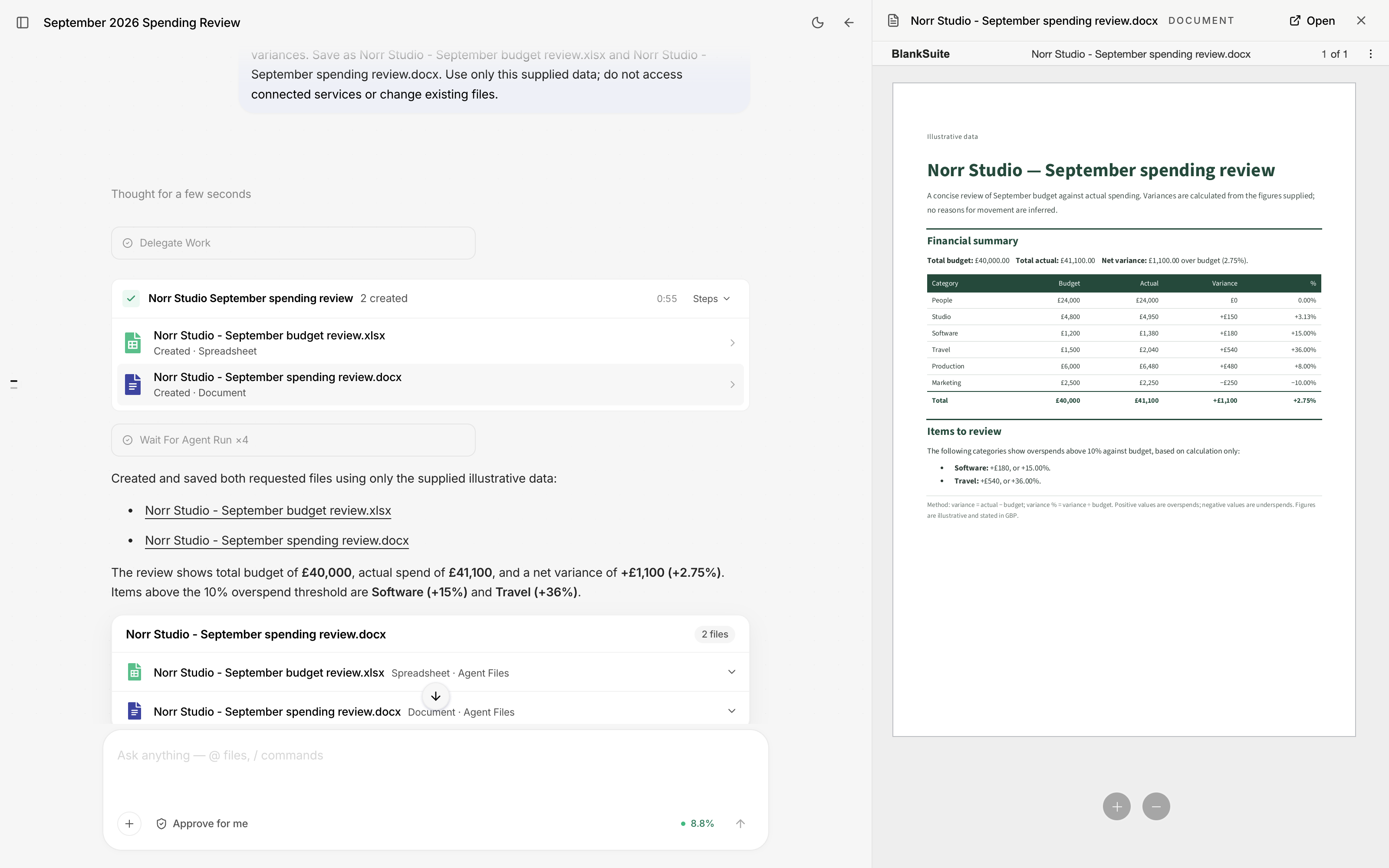
Blank can produce a budget workbook and a written review from the same request. This example uses six spending categories for a fictional company, Norr Studio. The agent calculates the variances, delegates the file creation and returns both files in the conversation.
The source figures total £40,000 in budget and £41,100 in actual spending. The brief asks for a workbook and a one-page report, with overspends above 10% flagged for review.
Set the scope and the outputs
Open Agent and describe the work. You can supply figures in the message, as in this example, or use the file control beside the message box to add an existing workbook. Files can also be referenced with @.
The request starts with the outputs and the rule for highlighting:
Prepare a September 2026 spending review for Norr Studio. Create an Excel workbook with budget, actuals, variance in pounds and percentage, a totals row, and a comparison chart. Highlight overspends above 10%. Also create a one-page Word report with a clear financial summary and the items to review. Delegate the work to a specialist and return both saved files.
We supplied budget and actual spending for People, Studio, Software, Travel, Production and Marketing. The rest of the brief specified deep green headings, readable tables and an “Illustrative data” label. It also told the agent to use only the supplied figures and avoid inventing reasons for the differences.
Those details define what a useful result looks like. For your own review, include the reporting period, currency, threshold and whether the original workbook may be changed.
Follow the delegated work
The agent delegated the job and displayed progress for the workbook and report. When it finished, the completed work card listed both created files. The response also included a short financial summary and links to the saved outputs.
A delegated job can cover more than one app. You can ask for analysis and a document together, rather than organising separate conversations for each file type.
Open the report beside the conversation
Select a returned file to preview it alongside the agent’s response. The Norr Studio report fits on one page, with a financial summary, a table covering all six categories and a short list of items to review. Select Open to continue working in the editor.
The summary identifies £1,100 of net overspending, or 2.75% of the total budget. Software is 15% over budget and Travel is 36% over budget. Both exceed the threshold. Production is 8% over budget, so it does not belong in that list.
The report presents the differences without assigning causes. Explaining a variance requires evidence beyond the budget and actual figures.
Inspect and refine the files
Check the calculations, currency and percentage formats, and page layout before sharing the work. Compare the totals with the source figures and check that the threshold has been applied as intended.
You can make similarly specific revisions: change the threshold, add a comparison or shorten the report. Keep the instruction in the same conversation so it refers to the files already created.
After reviewing the results, you can ask Blank to build a presentation from them or create follow-up tasks for the items that need attention. Specify the audience for the deck, or the owners and due dates for the tasks.
Explore Blank Agent or read how to create a board presentation.