Create a client proposal from a brief
Build a formatted Word proposal from project notes, then refine the scope and layout in Blank.
Blank ·
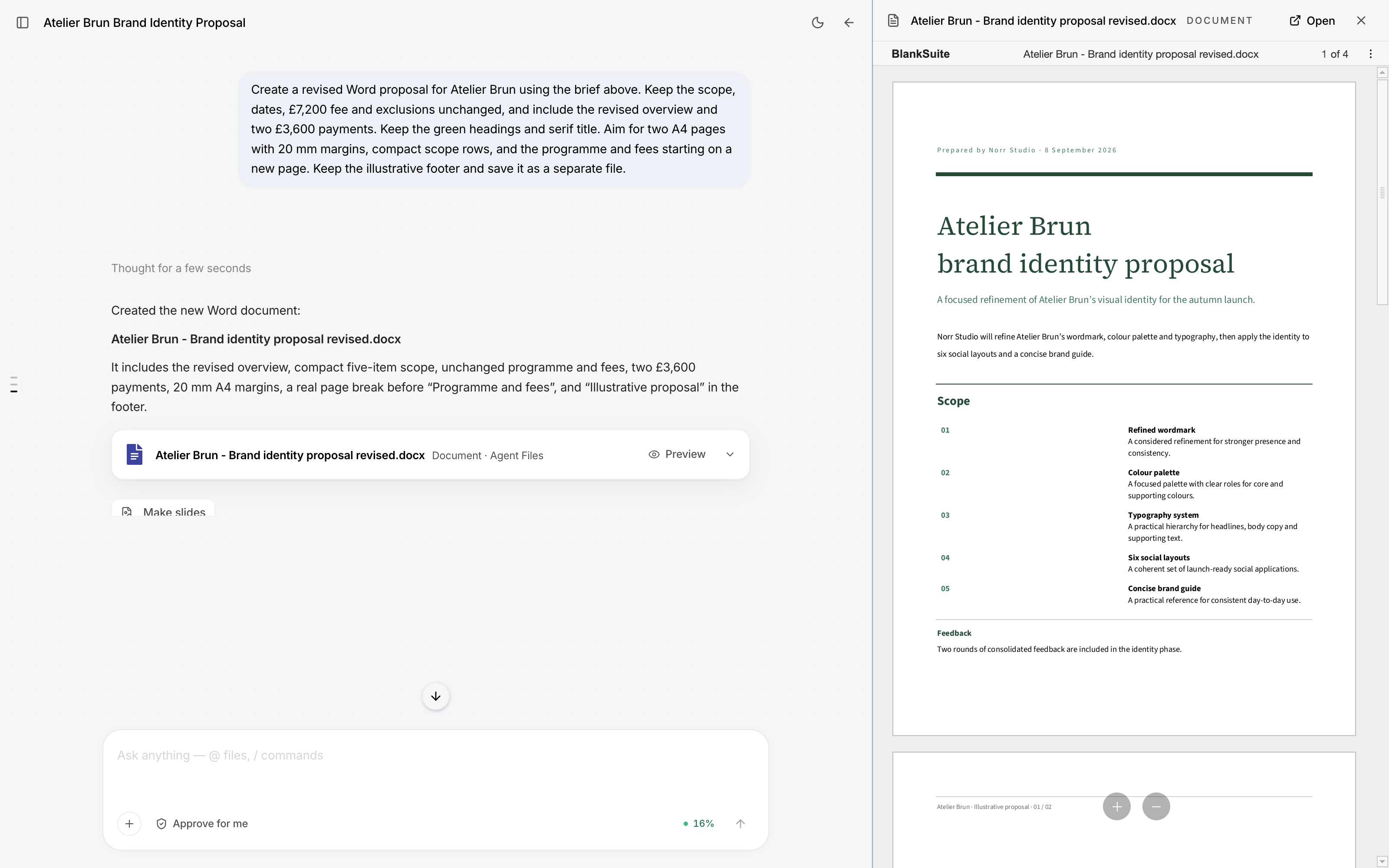
Blank can turn a project brief into a Word proposal with a title, scope, programme and fees. Include the facts the document needs to preserve and the layout you want. The agent creates the file, which you can preview beside the conversation and open in Writer.
This example is a brand identity proposal from Norr Studio to Atelier Brun. Both companies are fictional. The brief includes five deliverables, three phases of work and a total fee of £7,200, excluding VAT.
Supply the project details
Open Agent and describe the project. For this proposal, we supplied the deliverables: a refined wordmark, colour palette, typography system, six social layouts and a concise brand guide. We also specified the September dates, fees, included feedback rounds, exclusions and payment split.
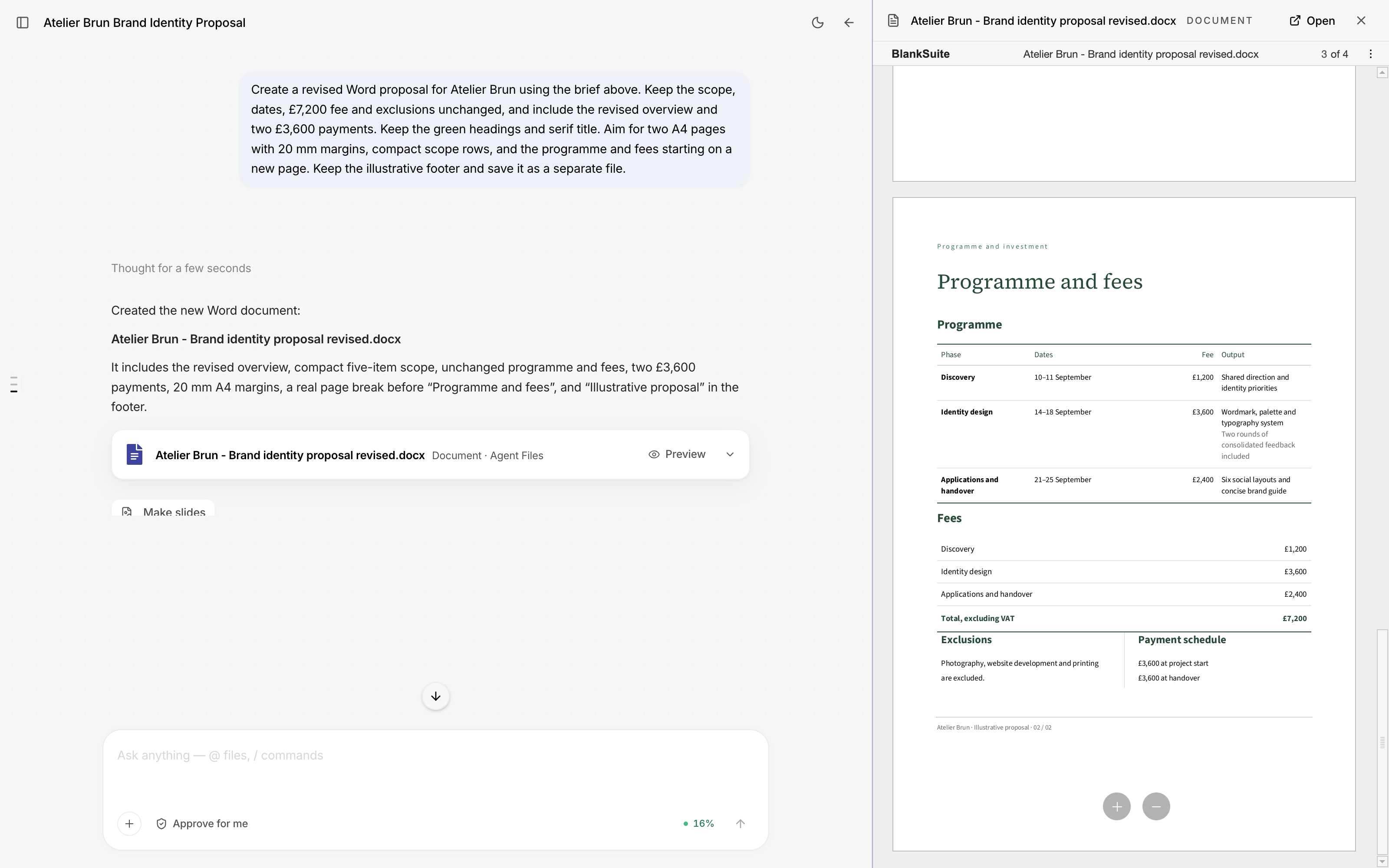
The fee breakdown was £1,200 for discovery, £3,600 for identity design and £2,400 for applications and handover. Photography, website development and printing were excluded. Providing those details gives the agent a defined scope to write from.
You can also attach a project brief or reference files with @. If a price or deadline has not been agreed, tell the agent to flag it for your attention rather than supply a figure.
Describe the document you need
The request covered the page structure as well as the writing:
Page 1 should have a strong title, short project overview and clear scope. Page 2 should contain a well-designed programme and fees table, exclusions and payment schedule. Use deep green headings, a restrained serif title, generous white space and consistent page furniture.
Specific design instructions give you a result you can assess. You can check whether the title is readable, whether the fees are easy to compare and whether each section sits on the intended page.
For this example, we asked for concise UK English and an “Illustrative proposal” footer. Blank returned a Word file that could be opened directly from the conversation.
Review the wording and layout
Select Preview on the returned file to read it beside the request. Check the scope against the brief, add up the fees and review the dates. Look at each page to check the table spacing and page breaks.
For a revised copy, we supplied a more direct opening overview:
Norr Studio will refine Atelier Brun’s wordmark, colour palette and typography, then apply the identity to six social layouts and a concise brand guide.
The revised brief also specified two payments of £3,600, a “Programme and fees” heading on page 2, and consistent 20 mm page margins. The fees and dates stayed the same. We requested a separate Word file so the original proposal remained available for comparison.
The revised copy contains the supplied opening, all five deliverables and the two £3,600 payments. The programme retains the three phases and £7,200 total.
A revision brief can combine writing and formatting instructions. Name the passage or section, describe the change and state what must be preserved. Check the preview before relying on the requested page count; section breaks and table spacing can affect pagination.
Continue working in the file
Use Open in the preview panel to continue in Writer. You can edit the proposal yourself, add comments or ask the agent for another change. Check the final document before sending it to the client.
The proposal can also become source material for another piece of work. Ask Blank to build a short presentation from the scope and programme, or create tasks for the agreed phases. Include the audience for the presentation, or the owners and dates for the tasks, in that next request.
Explore the office suite or read how to create a presentation from a report.